

Skip to content

Always-on security.
No conversation required.

The agent is what you talk to. Guardian is what runs when you are not in chat. It is an optional, local security engine — firewall, scanner, identity, patching and recovery — that starts disabled and only acts inside the mode you choose.

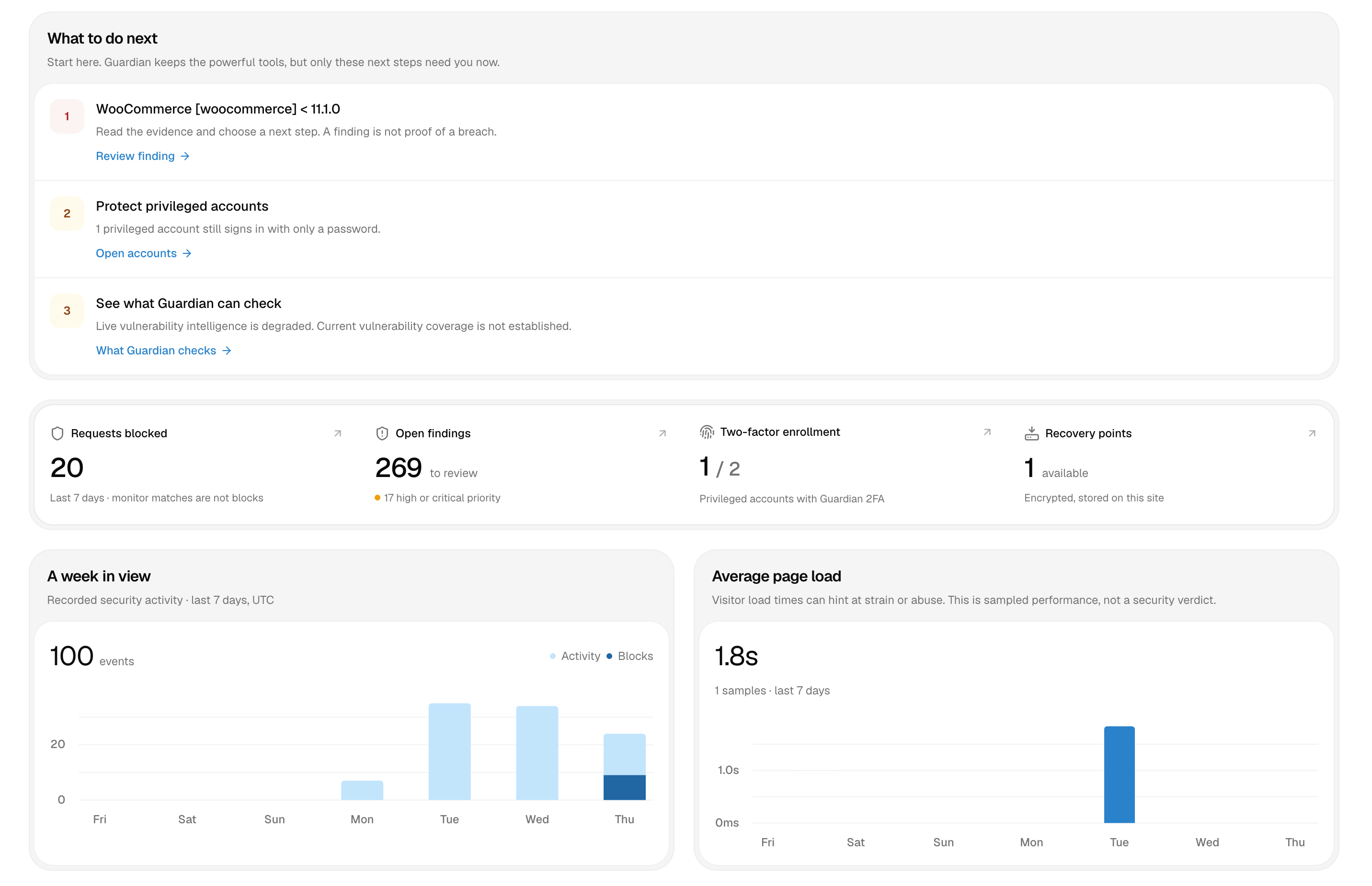
Talos Guardian overview in WordPress admin, with next actions, open findings, coverage and weekly activity
Overview · findings · coverage · account protection

A request firewall at the WordPress layer

Guardian inspects login, REST and anonymous traffic before it becomes a problem. Limits, lockouts and blocks are configured as policy, not as a pile of separate plugins.

  • Login rate limiting and failure-based lockouts
  • Anonymous REST and request rate limits
  • IP blocklist, path traversal and XML-RPC controls
  • AI crawler blocking, upload inspection and security headers
A live request log, not a body dump

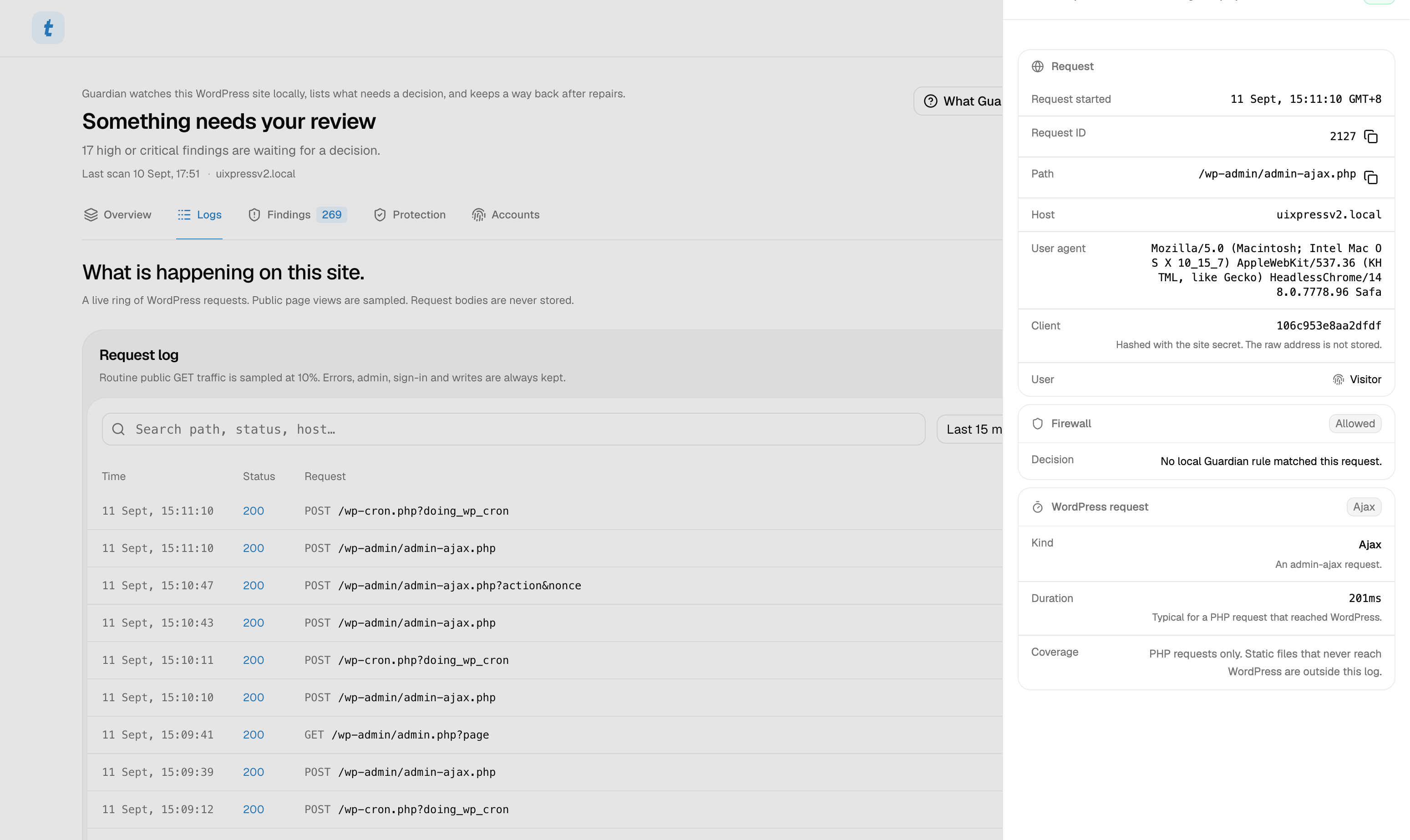
Guardian keeps a live ring of WordPress requests so you can watch traffic, slow endpoints and firewall decisions without opening a log file. Public page views are sampled. Request bodies are never stored.

  • Live updates you can pause
  • Filter by time, status and request kind
  • Errors, admin, sign-in and writes are always kept
  • Hashed client addresses — bodies never stored

Scanning that can pause and resume

A full assessment walks configuration, installed components, database content and the filesystem in bounded batches, so a large site does not time out mid-scan. Official WordPress core and plugin checksums sit alongside heuristic PHP and JavaScript detection.

  • Config, component, database and file phases
  • Official core and plugin checksum verification
  • Heuristic malware rules plus interprocedural PHP flow analysis
  • File change tracking with SHA-256 checksums

Identity protection for the people who can do the most damage

Administrators get TOTP two-factor authentication with encrypted secrets, WebAuthn passkeys, and lockouts that never apply to admin accounts. Sessions and application passwords can be revoked from the same screen.

  • TOTP with AES-256-GCM secrets and recovery codes
  • WebAuthn passkeys on the WordPress login screen
  • Optional administrator 2FA requirement
  • Session and application password revocation

Vulnerability intelligence that matches your install

Installed core, plugins and themes are compared against a signed advisory feed, the public WPVulnerability catalog and cloud AI source analysis. Version-range matching tells you what is actually affected — not a generic score.

Repair with a way back

Every repair is previewed, actor-bound and backed up into an encrypted vault before a byte is written. Official core and plugin files can be restored from upstream, encoded scripts cleaned from posts, and executable uploads quarantined. AI-generated plugin patches go through two LLM review passes, PHP syntax checks and a bootstrap health probe — then roll back automatically if the site fails that probe.

  • Encrypted recovery vault with hash verification
  • Official package restore for core and plugins
  • AI patches with static review and health-check rollback
  • Optional off-site encrypted checkpoint export

Automation without autonomy

Four modes set the ceiling: Monitor records, Protect enforces, Maintain adds allowlisted plugin updates inside a UTC window, and Respond can quarantine an executable upload only when a fresh scan also confirms request-controlled execution. Playbooks are bounded — one action per run, never arbitrary code.

See what is hitting the site. While it is happening.

Guardian keeps a live ring of WordPress requests so you can watch traffic, slow endpoints and firewall decisions without opening a log file.

Talos Guardian live request log in WordPress admin, with a request detail sheet open

A live request log, not a body dump.

Public GET traffic is sampled at 10%. Errors, admin, sign-in and writes are always kept. Open any row for the firewall decision, duration and a hashed client address.

  • Live updates you can pause
  • Filter by time, status and request kind
  • Errors, admin, sign-in and writes are always kept
  • Hashed client addresses — request bodies never stored

The specifics.

Policy modes

Monitor · Protect · Maintain · Respond

Scan phases

Config · Components · Database · Files

2FA methods

TOTP · WebAuthn passkeys

Repair types

Core · Plugin · Post · Quarantine · AI patch

Scan schedule

Manual · Hourly · Twice daily · Daily

Rate limits

Login, REST and anonymous request windows

Request log

Live ring · 10% public GET sample · bodies never stored

Good to know.

Does Guardian replace my security plugin?

For most sites, yes. Guardian covers request protection, scanning with official checksums, account hardening, vulnerability matching and reversible repair. You can still run a specialist firewall or WAF in front if you want defence in depth — Guardian is the WordPress-layer piece.

Does it slow my site?

Scans are resumable and bounded, so they yield rather than lock the request. Request logging samples ordinary GET traffic and stores compact summaries, not bodies. Page-load timing is opt-in sampling. The firewall work is the same class of check a dedicated security plugin already runs on every request.

What does the live request log store?

Compact summaries of PHP requests that reached WordPress: method, path, status, duration, kind and a hashed client address. Request bodies are never stored. Routine public GET traffic is sampled at 10%; errors, admin, sign-in and writes are always kept. Static files that never reach PHP stay outside this log, and the ring lives in a local file — not the database.

Can the agent access Guardian?

Yes, but only through dedicated repair tools in a local chat session. The agent can inspect, preview, apply and roll back a Guardian repair with the same approval cards as any other high-impact action. Remote and scheduled agents cannot use those tools, and one chat session cannot see another session’s repairs.

What data leaves my site?

Scanning, firewalling, 2FA and the recovery vault stay on your WordPress install. Connecting Talos Cloud shares software inventory and receives vulnerability summaries and uptime on heartbeat. AI plugin patches send the affected source files to Talos Cloud for generation and review; source is not persisted in a shared catalog. Independent recovery export is opt-in and encrypted.

Put an agent to work in WordPress.

Spend less time clicking through admin and more time moving your site forward.