
Manage WordPress from one conversation
Create and update content, moderate comments, manage media, inspect settings, work with plugins and themes, and handle routine admin without hunting through screens.
View featureManage content, diagnose issues, and automate recurring work from one chat. You set the permissions. Talos handles the clicks.
Three products, one system. Switch between them instead of scrolling through every capability at once.
Create content, inspect plugins, diagnose issues and run approved work from chat. You set the permissions. Talos handles the clicks.
The work behind the menus, available from chat — with the controls required to use an agent on a real production site.
Create and update content, moderate comments, manage media, inspect settings, work with plugins and themes, and handle routine admin without hunting through screens.
View featureTalos can inspect site health, logs, cron, cache, database structure and HTTP responses. It turns evidence into clear findings—not generic AI advice.
View featureDraft a workflow in plain language, choose a schedule or WordPress hook, then lock its scope before it runs. Talos handles the repetitive work in the background.
View featureChoose which roles can use Talos, which tools are available and which actions always require confirmation. Token budgets and run limits keep usage predictable.
View featureGuardian adds a request firewall, resumable scanning, 2FA, vulnerability intelligence and AI-assisted patching — all running locally, independently of the agent.
View featureEach of these walks through a real run: the tools involved, and the workflow that makes it recurring.
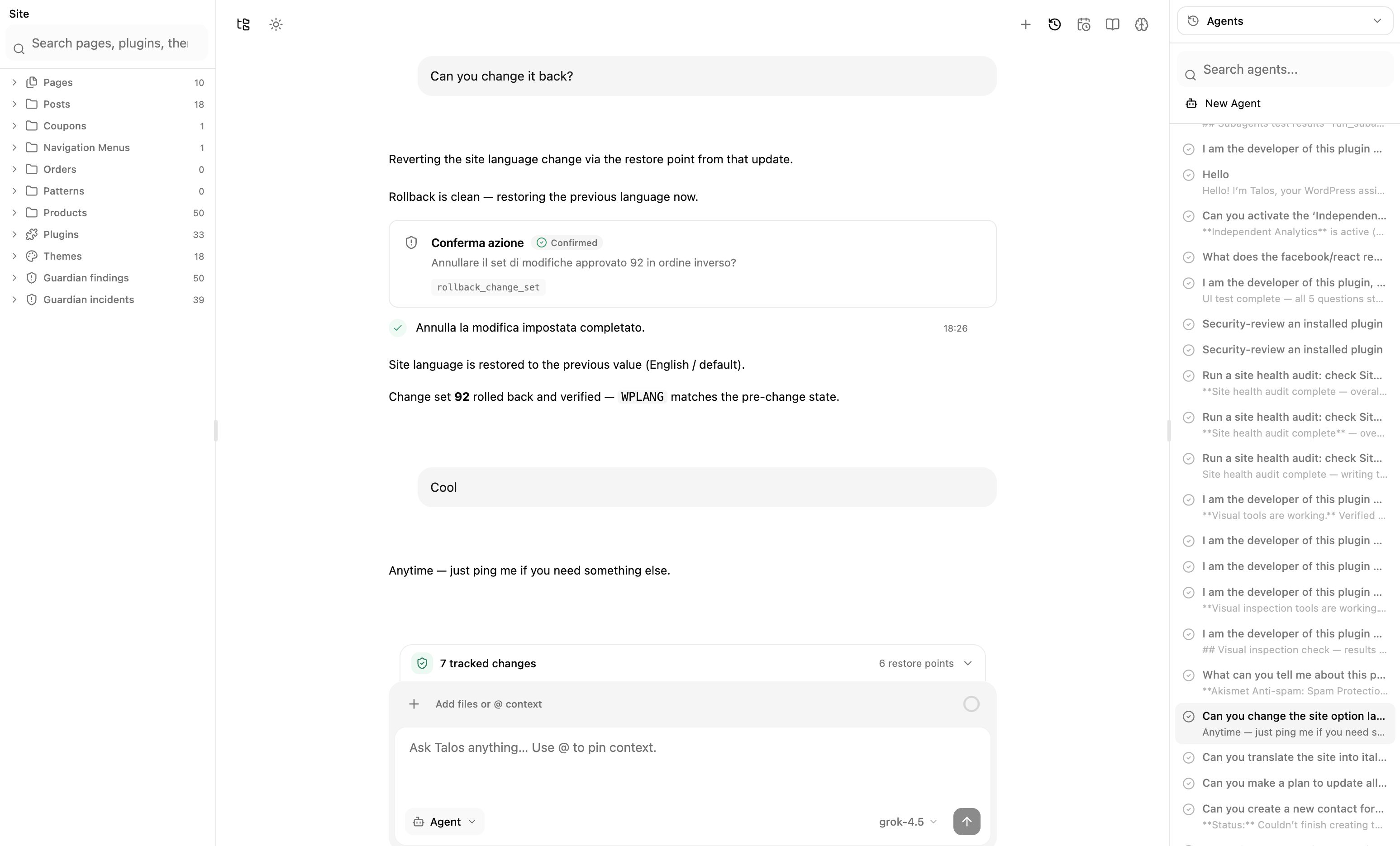
The interface stays quiet when nothing is happening and becomes precise when the agent starts to act.
Talos exposes the useful middle of every run: which tool is active, what it found, what changed and whether the result was verified.
AI should not mean giving up control. Talos makes risk visible and permission explicit at every layer.
Allow, restrict or require confirmation for every tool. Choose which WordPress roles can use the agent.
Dangerous plugin actions, rollbacks and other high-impact tools stop for explicit confirmation.
Tracked changes include snapshots and checksums, so rollback refuses to overwrite work that has drifted.
AI Engine, Novamira, Jetpack AI, and Frontman against the admin agent Talos actually ships: tools that act on your site, approval gates, reversible changes, workflows, and Guardian.
| Feature | Talos | AI Engine | Novamira | Jetpack AI | Frontman |
|---|---|---|---|---|---|
In-admin agent that acts on the site | Talos: Chat in WordPress admin with defined tools for content, plugins, users, media, and settings | AI Engine: MCP lets Claude or ChatGPT manage the site; in-admin is chatbots and editor copilot. Advanced MCP tools are Pro | Novamira: MCP and CLI give Claude, Cursor, or Codex full PHP, WP-CLI, and file access. The agent lives in that client, not a WordPress admin chat | Jetpack AI: Editor writing assistant — generates and rewrites content, not admin operations | Frontman: Visual editor for posts, pages, blocks, Elementor, menus, and settings — not plugins, users, cron, or logs |
Ask, Plan and Agent modes | Talos: Ask is inspect-only, Plan waits for approval, Agent uses the full allowed tool set | AI Engine: No | Novamira: No | Jetpack AI: No | Frontman: No |
Per-tool permissions and approval gates | Talos: Disable, always ask, or allow each tool. High-impact actions stop for confirmation | AI Engine: Role-based access, usage limits, and content filters — not a per-tool allow, ask, or deny catalog | Novamira: Abilities Hub can toggle PHP, WP-CLI, files, and uploads on or off. No always-ask gates, and they advise against enabling abilities on production | Jetpack AI: No | Frontman: Administrators only, with option allowlists. Changes are reviewed after they land, not gated per tool |
Change tracking and rollback | Talos: Write operations record before-and-after snapshots with checksums and drift-checked rollback | AI Engine: No | Novamira: New PHP lands in a recoverable sandbox. Database, config, and live code changes run immediately and do not roll back | Jetpack AI: Jetpack Backup is a separate paid product — not rollback of the AI’s own edits | Frontman: Early-access software that recommends staging and a backup. No change-set rollback |
Scheduled and hook workflows | Talos: Plain-language workflows on a schedule or WordPress hook, with scopes locked at enable time | AI Engine: Function calling and task automation exist — not scoped, scheduled WordPress workflows | Novamira: WP-CLI can run as a background job for long migrations. Not scheduled or hook-triggered prompt workflows | Jetpack AI: No | Frontman: No |
Evidence-backed site diagnostics | Talos: Inspects site health, logs, cron, cache, database structure, and HTTP responses | AI Engine: No | Novamira: An external agent can debug through PHP, WP-CLI, and the database. Not a structured health, log, or cron diagnostic catalog | Jetpack AI: Jetpack offers downtime monitoring and stats — not an agent that diagnoses from site evidence | Frontman: Can inspect the visible page structure. Not a site-health or log diagnostic agent |
Built-in security layer | Talos: Guardian adds a request firewall, resumable malware scanning, 2FA, and AI-assisted patching | AI Engine: No | Novamira: Positioned for development and staging. Full PHP access is the product — not a firewall, scanner, or 2FA layer | Jetpack AI: Jetpack Security is a separate paid product — WAF, malware, and backups are not part of Jetpack AI | Frontman: No |
Multi-site cloud control plane | Talos: Talos Cloud centralises models, spend, policies, and portfolio health without routing site AI traffic through one host | AI Engine: Multiple sites can be managed in one MCP conversation — not a dedicated fleet control plane | Novamira: Direct client-to-site MCP or CLI. No hosted proxy and no portfolio control plane | Jetpack AI: Requires a Jetpack / Automattic connection. Not an AI portfolio control plane | Frontman: Hosted UI loads from app.frontman.sh. Not a WordPress fleet control plane |
Learned, replayable skills | Talos: Successful tool sequences compile into reviewable, site-scoped skills you approve before replay | AI Engine: Pro Assistants are reusable chatbot setups — not skills learned from successful admin runs | Novamira: You author Markdown playbooks the agent follows when a task matches. Pro adds session memory — not skills compiled from successful runs | Jetpack AI: No | Frontman: No |
Bring your own AI keys | Talos: Connect Anthropic, OpenAI, Google Gemini, or xAI. Usage is billed by the provider | AI Engine: Bring your own keys for OpenAI, Anthropic, Google, xAI, and more | Novamira: Connect Claude, Cursor, Codex, Gemini CLI, or any MCP client. The provider is billed on that client | Jetpack AI: Uses Jetpack’s hosted AI with a request quota. You cannot attach your own provider keys | Frontman: Bring your own Claude, ChatGPT, or OpenRouter key |
Runs on self-hosted WordPress | Talos: Installs on WordPress 6.0+ with PHP 8.2+. Conversations and jobs stay on your site | AI Engine: Self-hosted plugin. Data stays on your server | Novamira: Self-hosted plugin and MCP server. Requires WordPress 6.9+ and PHP 8.0+. Intended for development and staging | Jetpack AI: Installs on self-hosted WordPress but requires a Jetpack account connection | Frontman: WordPress plugin. The default UI loads from Frontman’s hosted app unless you self-host the server |
One-time license | Talos: Lifetime plans from Solo, with the complete agent, Guardian, and Cloud included | AI Engine: Pro starts at $79 / year for one site. Lifetime begins at $499 for five sites | Novamira: Core MCP access is free forever. Pro starts at €49 / year. Agency Lifetime is €299 for 1,000 sites | Jetpack AI: Standalone AI is a monthly subscription. Also bundled in Jetpack Complete | Frontman: Self-hosting is currently free. Hosted Pro is €15 / month per seat — no lifetime license |
| Starting price | $49 · lifetime | $79 / yr | Free | $8 / mo | €15 / mo |
Included Limited Not available
Current plans, September 2026.
One-time lifetime licenses. Every plan includes the complete agent, Guardian, Cloud access, and lifetime updates.
1 site
Launch price
For one WordPress site and the person who runs it.
10 sites
Launch price
For professionals managing a growing portfolio of sites.
Unlimited sites
Launch price
For teams operating WordPress at serious scale.
Secure checkoutCommercial use included14-day money-back guaranteeBring your own AI provider
Talos is an AI agent that runs inside WordPress admin. It can inspect your site, complete admin tasks, diagnose issues and run approved workflows from a chat interface.
You decide. Tools can be disabled, fully allowed or set to always ask. High-impact actions have confirmation gates, while Ask mode is inspect-only and Plan mode requires plan approval before work starts.
Talos tracks supported write operations in change sets with before-and-after snapshots. You can preview, verify and roll back approved change sets, with drift checks to protect newer edits.
Talos supports Anthropic, OpenAI, Google Gemini and xAI. You connect your own provider keys and can enable multiple model profiles.
Talos requires WordPress 6.0 or newer and PHP 8.2 or newer. Background workflows use WordPress cron; a server cron is recommended for low-traffic or time-sensitive sites.
Conversations, jobs, workflows, audit events and restore data are stored in your WordPress installation. Requests sent to your selected AI provider are governed by that provider’s terms.
Spend less time clicking through admin and more time moving your site forward.